

Dofollow vs nofollow links: plus sponsored and ugc explained
A “dofollow” link is simply a normal link with no special rel value, and Google treats it as a regular link it can follow and count. A nofollow link carries rel="nofollow", and since 2019 Google has two more specific values: rel="sponsored" for paid, affiliate and advertising links, and rel="ugc" for links in comments and forum posts.
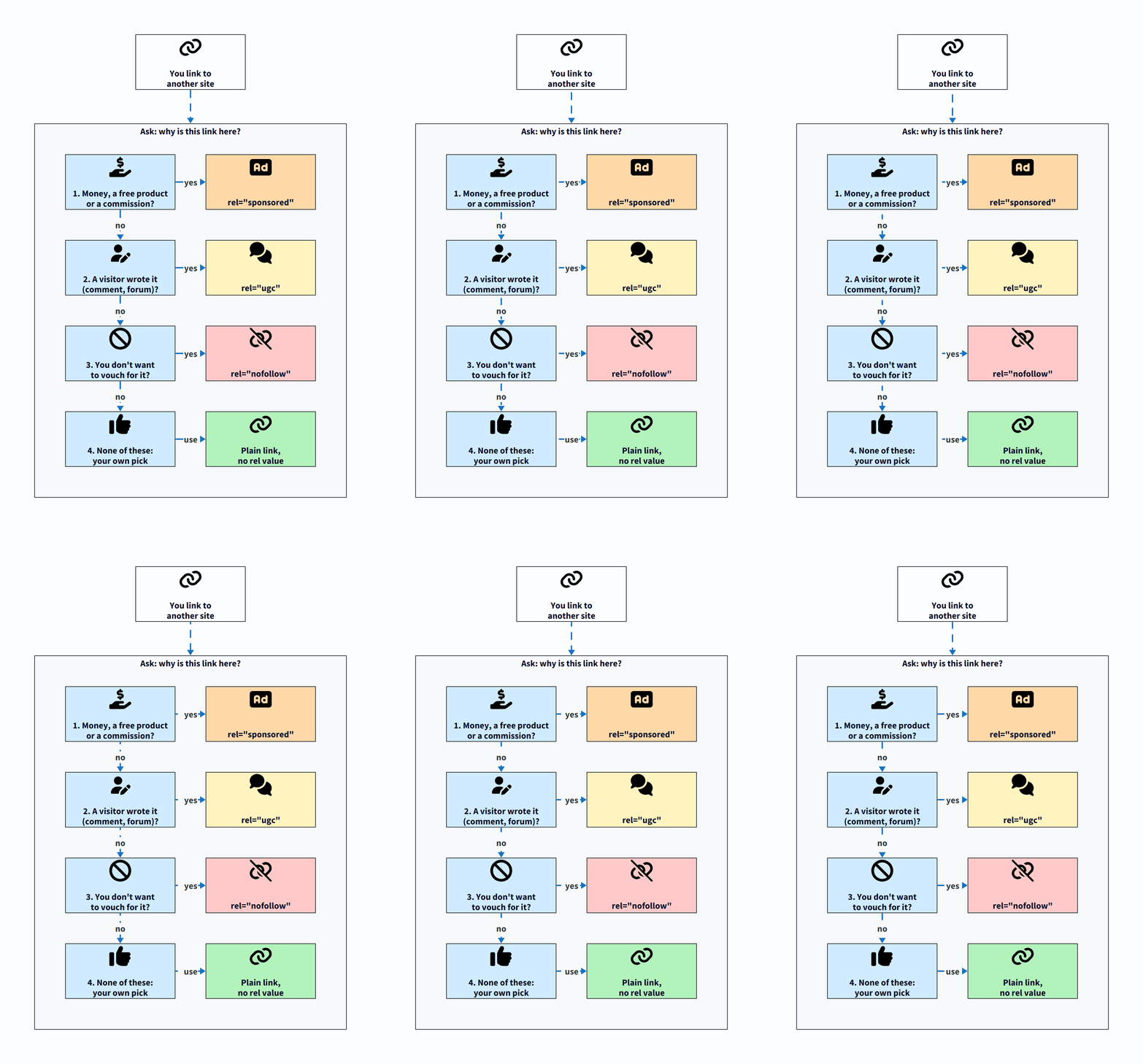
Use a plain link when you link to something on your own judgement, sponsored when money, goods or a commission is involved, ugc when a visitor wrote the link, and nofollow when none of those fit but you still don’t want to vouch for the page. The rest of this guide explains what Google actually says about each value, how to add them in WordPress, and how to check any link in a few seconds.
Last updated: 7 November 2026
What is the difference between dofollow and nofollow links?
The difference is one attribute in the HTML of the link. Here is a normal link:
<a href="https://example.com/guide/">a useful guide</a>And here is the same link marked nofollow:
<a href="https://example.com/guide/" rel="nofollow">a useful guide</a>Readers can’t tell them apart. Both look the same, and both take the visitor to the same page. The rel attribute is a note for search engines about your relationship with the page you are linking to.
One thing confuses a lot of beginners: there is no rel="dofollow" value. “Dofollow” is just the name bloggers gave to links that have no qualifying value. Google’s own documentation on how to qualify your outbound links says that for regular links you expect Google to follow without qualification, you don’t need to add a rel attribute at all. If you see a plugin or tutorial telling you to add rel="dofollow", you can skip it. It does nothing.
What does Google say about rel=”nofollow”, “sponsored” and “ugc”?
Google’s qualify outbound links page lists three values. In plain words:
| Value | Use it for | Example |
|---|---|---|
rel="sponsored" |
Advertisements and paid placements (paid links) | A link a brand paid you to include in a review |
rel="ugc" |
Links inside user-generated content, such as comments and forum posts | A reader’s website link in your comment section |
rel="nofollow" |
Any other case where you don’t want Google to associate your site with the page, or crawl it from your site | A link to a page you are criticising |
A few details from the same page are worth knowing:
- Nofollow still works for paid links. Google says nofollow was previously recommended for paid links and is still an acceptable way to flag them, though
sponsoredis preferred. - You can combine values. A space-separated list like
rel="ugc nofollow"is valid. So is a comma-separated one. - Qualified links can still be crawled. Google says links with these values “will generally not be followed”, but the linked page may still be found another way, such as a sitemap or a link from another site.
- Nofollow is not a way to hide your own pages. For your own URLs, Google points you to the robots.txt disallow rule (to stop crawling) or the noindex rule (to stop indexing).
Are nofollow links ignored completely?
Not any more. When Google announced sponsored and ugc in its September 2019 post, Evolving “nofollow”, it also changed how nofollow works. All three values are now treated as hints about which links to consider or exclude, used alongside other signals, rather than strict commands. For crawling and indexing, nofollow became a hint on 1 March 2020.
The same post explains why: links carry useful information, such as the words used to describe the page they point to, and looking at all links helps Google spot unnatural linking patterns. In practice Google said it would “generally treat them as we did with nofollow before and not consider them for ranking purposes.”
So a nofollow link is not worthless. It can still send you readers, and Google may still learn something from it. But you shouldn’t expect it to pass ranking credit the way a normal editorial link might.
What happens if you use the wrong value?
Google’s 2019 FAQ answers this directly. There is no wrong value except for paid links. If you mark a comment link or an ordinary link as sponsored, the worst case is that Google doesn’t count it as credit for the other page. The problem is the other direction: a link that is clearly paid but has no sponsored or nofollow value.
When should you use each type of link?
Ask one question about every link: why is this link here? The answer tells you which value to use.
When should a link have no rel value (a normal “dofollow” link)?
Leave the link plain when you chose to link because the page is useful to your reader and nobody paid or rewarded you for it. That covers most links on a healthy blog:
- links to official documentation and sources you cite
- links to other bloggers whose work you recommend
- links between your own posts (internal links)
- links to tools you use and mention, with no affiliate deal
Internal links should almost always be plain. They help readers move around your site and help Google find your pages. Adding nofollow to your own links doesn’t “save” anything, and Google’s advice for keeping your own pages out of search is noindex or robots.txt, not nofollow. If you are still building out your site, the WordPress blog setup guide covers the settings that matter more.
When should you use rel=”sponsored”?
Use sponsored whenever a link exists because of some kind of payment or reward. Google’s spam policies list these as examples of link spam when the links pass ranking credit:
- exchanging money for links, or for posts that contain links
- exchanging goods or services for links
- sending someone a product in exchange for writing about it and including a link
- advertorials or native advertising where payment is received for articles with links that pass ranking credit
The same page is clear that buying and selling links for advertising is normal, and is not a violation “as long as they are qualified with a rel=”nofollow” or rel=”sponsored” attribute value”.
Affiliate links count too. In its July 2021 post, A reminder on qualifying links, Google says using affiliate links to monetise a site is fine, but asks sites in affiliate programs to qualify those links with rel="sponsored", whether the links were added by hand or automatically. It warns that sites failing to do this may get manual actions, and its systems may also take algorithmic action. The same post asks sites that publish or accept sponsored and guest posts to apply the right rel values to those links.
For example, a cooking blogger who reviews a stand mixer and links to it through a store’s affiliate program should use rel="sponsored" on that link. If the brand also sent the mixer for free, that link needs sponsored too, even if there is no commission.
When should you use rel=”ugc”?
Use ugc for links your visitors write: blog comments, forum replies, community profiles and guest book entries. Google adds a useful exception: if you want to reward trustworthy contributors, you might remove the value from links posted by members who have consistently made high-quality contributions over time.
On a WordPress blog you rarely need to do this by hand, because WordPress already adds it to comment links. More on that below.
When should you use rel=”nofollow”?
Use plain nofollow when the link isn’t paid and wasn’t written by a visitor, but you still don’t want to vouch for the page. A few realistic cases:
- You link to a scam site or a misleading article to warn readers about it.
- You link to a page as an example of what not to do.
- You link to a source you have to mention but don’t trust.
If you find yourself adding nofollow to most of your outbound links “just to be safe”, stop and reconsider. Linking to good sources is part of writing a helpful post. A ghostwriter publishing under a client’s name, for example, should cite sources normally; there is more on writing for clients in how to become a ghostwriter.
Quick decision checklist
- Did anyone pay, send a free product, or offer a commission for this link? Use
sponsored. - Did a visitor or commenter write this link? Use
ugc(WordPress usually does it for you). - Do you want to link without vouching for the page? Use
nofollow. - None of the above? Leave the link plain.
How do you add nofollow, sponsored or ugc links in WordPress?
You have three options, from easiest to most flexible.
Option 1: the “Mark as nofollow” toggle in the block editor
WordPress’s own link settings include a nofollow switch. In the WordPress 7.1 source code (checked on 7 November 2026), the link settings for text links and for the Button block list “Open in new tab” and “Mark as nofollow”. To use it:
- Select the text you want to link and press Ctrl+K (Cmd+K on a Mac), or click the link icon in the toolbar.
- Paste or search for the URL and press Enter.
- Click the link again, then click the pencil (edit) icon.
- In the link settings (expand Advanced if you see it), turn on Mark as nofollow.
- Save or update the post.
There is no matching toggle for sponsored or ugc in core, so for those use option 2 or 3.
Option 2: edit the link’s HTML
This works for any value, on any WordPress site, with no plugin:
- Click the paragraph block that contains the link.
- Open the three-dot menu in the block toolbar and choose Edit as HTML.
- Find the link and add the value inside the opening tag, for example
rel="sponsored". If arelattribute already exists (for examplerel="noopener"on a link that opens in a new tab), add your value to it:rel="noopener sponsored". - Switch back with Edit visually from the same menu and update the post.
If the block shows a “This block contains unexpected or invalid content” warning after you switch back, you probably broke a quote mark. Undo and try again.
Option 3: an SEO plugin
Several SEO plugins add their own link options. For example, Rank Math’s listing on wordpress.org mentions settings to open external links in new tabs and nofollow external links. Check what your plugin does before relying on it, and be careful with any “nofollow all external links” setting: it would also nofollow the sources you are happy to vouch for. If you need help adding a plugin, see how to install a WordPress plugin, and for a short list of plugins worth having, see essential WordPress plugins.
What does WordPress do to comment links automatically?
Quite a lot, and it is worth knowing so you don’t duplicate the work. In the WordPress 7.1 source code (checked 7 November 2026):
- Links typed into a comment are given
rel="nofollow ugc"when the comment is saved. This has been the case since WordPress 5.3. - The comment author’s website link (the name that links to their site) gets
ugc, plusexternal nofollowwhen it points to another site. - Plain URLs in comments that WordPress turns into clickable links get
nofollow(for external web links) andugc.
So a default WordPress install already follows Google’s advice for comments. You don’t need a plugin for it.
How do you check whether a link is nofollow, sponsored or ugc?
You don’t need an SEO tool. Your browser shows you everything.
Method 1: Inspect the link
- Right-click the link on the page.
- Choose Inspect (Chrome, Edge and Firefox all have it).
- The developer tools open with the link’s
<a>tag highlighted. Look for arelattribute.
No rel, or a rel with only values like noopener or noreferrer, means it’s a normal link. Those two values are about browser security when a link opens in a new tab, not about search engines. Chrome’s documentation on inspecting the DOM walks through the panel if it’s new to you.
Method 2: View the page source
- Press Ctrl+U in Chrome, Edge or Firefox on Windows to open the page source (or right-click the page and choose View page source).
- Press Ctrl+F and search for
nofollow,sponsoredorugc.
This is quick for scanning a whole post, for example to confirm every affiliate link on a review page is marked. Note that page source shows the HTML the server sent; if a script changes links afterwards, Inspect shows the final version.
Method 3: check the page-level robots meta tag
A page can also apply nofollow to every link on it with a robots meta tag in the <head>, such as <meta name="robots" content="nofollow">. Google’s qualify links page notes that nofollow is the one value also available as a robots meta tag. If you are checking a link you were promised, search the source for name="robots" as well.
What mistakes should you avoid with link attributes?
- Leaving affiliate or paid links plain. This is the one mistake Google says can lead to manual or algorithmic action. Audit old reviews and “best of” posts too.
- Adding
rel="dofollow". It isn’t a real value. Remove it or leave it; it does nothing either way. - Nofollowing your own internal links. It doesn’t help your SEO, and it can make it harder for Google to find your pages.
- Using nofollow to keep a page out of Google. Use noindex for that. Google’s noindex documentation explains how.
- Nofollowing every outbound link. Citing good sources plainly is normal and helps readers judge your work.
- Removing
ugcfrom all comment links to “reward” commenters. Google suggests doing this only for contributors with a long record of quality, not across the board, because comment sections attract spam. - Buying “dofollow backlinks”. Paying for links that pass ranking credit is exactly what Google’s link spam policy describes. If you want links, earn them with useful posts and promotion; see how to promote your blog.
More SEO slip-ups like these are covered in the most common SEO mistakes bloggers make.
Do nofollow backlinks still help your blog?
They can, just not as a ranking shortcut. A nofollow link from a busy forum thread, a news article or a social profile can send real readers to your blog, and some of those readers may later link to you normally. Since Google treats these values as hints, it may also use nofollow links to understand the web better, though it doesn’t promise any ranking benefit.
The healthy way to think about it: build links for readers, not for a “dofollow ratio”. Write posts that answer real questions, share them where your audience already is, and let links come from people who found them useful. If you are building your name as well as your blog, how to build a personal brand covers where to show up, and SEO tips for bloggers covers the basics that matter more than any link attribute. And if you want a new post found quickly, read how to get Google to index a new page fast.
Frequently asked questions
Is there a rel=”dofollow” attribute?
No. A “dofollow” link is just a normal link with no qualifying rel value. Google says regular links don’t need a rel attribute at all.
Should affiliate links be nofollow or sponsored?
Google asks for rel="sponsored" on affiliate links. Nofollow is still accepted for paid links, but sponsored is the preferred value.
Can I use more than one rel value on a link?
Yes. Values like rel="nofollow ugc" or rel="noopener sponsored" are valid. Separate them with a space or a comma.
Does WordPress add nofollow to comment links automatically?
Yes. WordPress adds nofollow ugc to links in comment text when a comment is saved, and adds ugc plus nofollow to external comment author links (checked in the WordPress 7.1 source on 7 November 2026).
Will a nofollow link stop Google from finding a page?
No. Google may still find and crawl the page through sitemaps or links from other sites. To keep your own page out of search results, use the noindex rule instead.